



In today’s fast-paced localization workflows, efficiency and linguistic quality go hand in hand. That is why the integration of the widely trusted writing assistant, Antidote, into memoQ editor marks an important milestone. Available since memoQ version 12.2, this is a major step forward for translators and reviewers.
But what is Antidote? It is a French/English writing assistant that is now natively integrated into memoQ editor. Thanks to Antidote, localization teams can run grammar, spelling, typography, and style checks on translated segments without leaving the translation environment. The integration supports both French and English, and can be customized based on the language variant. Antidote automatically syncs corrections back into the translation environment, and the user only needs to confirm them in the translation memory.
“The integration of Antidote’s advanced corrector into memoQ supports productivity by eliminating export/import steps and enabling real-time corrections within the translation environment, streamlining the entire workflow. At the same time, it strengthens quality and consistency by embedding powerful grammar, style, and lexical resources into the process, allowing linguists to refine language seamlessly without leaving memoQ.” – Anna Mohácsi-Gorove, Senior Training Manager at memoQ
Built for the Modern Translation Workflow
The integration is available in memoQ editor, reflecting memoQ’s continued investment in browser-based solutions. For linguists working online, this is especially impactful. Native browser-based spellchecking tools are often limited, but Antidote provides:
- Advanced grammar and linguistic checks
- Comprehensive English resources, including a collection of 10 dictionaries
- Linguist-verified content
- Personal dictionary customization
- Custom rule support
- Support for English variants (US, UK, and Canada)
- Support for French variants (Belgium, France, Quebec/Canada, Switzerland, and Africa/Caribbean/Louisiana)
- Translations for each entry and definitions in the other language’s dictionaries accessible in one click
- Faithful paraphrasing suggestions, sorted in order of creativity
- Integrated external resources
- Guaranteed data privacy
“From the beginning, we designed Antidote with language professionals in mind, making sure it works smoothly with their tools. While not the only language tool to use AI, our software is based on human computational linguistics. For 30 years, Antidote has drawn its strength from a team of linguists who relentlessly analyze and catalogue how language changes over time. Antidote also evolves along with technology, consistently offering updated, state-of-the-art resources for language professionals.” – Maud Pironneau, Director of Linguistic Development at Druide
Key benefits of the integration
1. Everything in One Place
No more switching between tools or manually copying corrections. The entire review process happens within memoQ, saving time and reducing friction.
2. Higher Linguistic Quality
Antidote goes far beyond basic spellchecking, helping catch subtle issues in grammar, typography, and consistency that are easy to miss during segment-based translation.
3. Personalized and Adaptive
Users can customize Antidote with their own rules and dictionaries. These preferences carry over into memoQ, ensuring consistency across all projects.
4. Seamless Workflow
Work without interruptions or context switching. All corrections are applied directly in memoQ, eliminating manual rework and ensuring translation consistency.
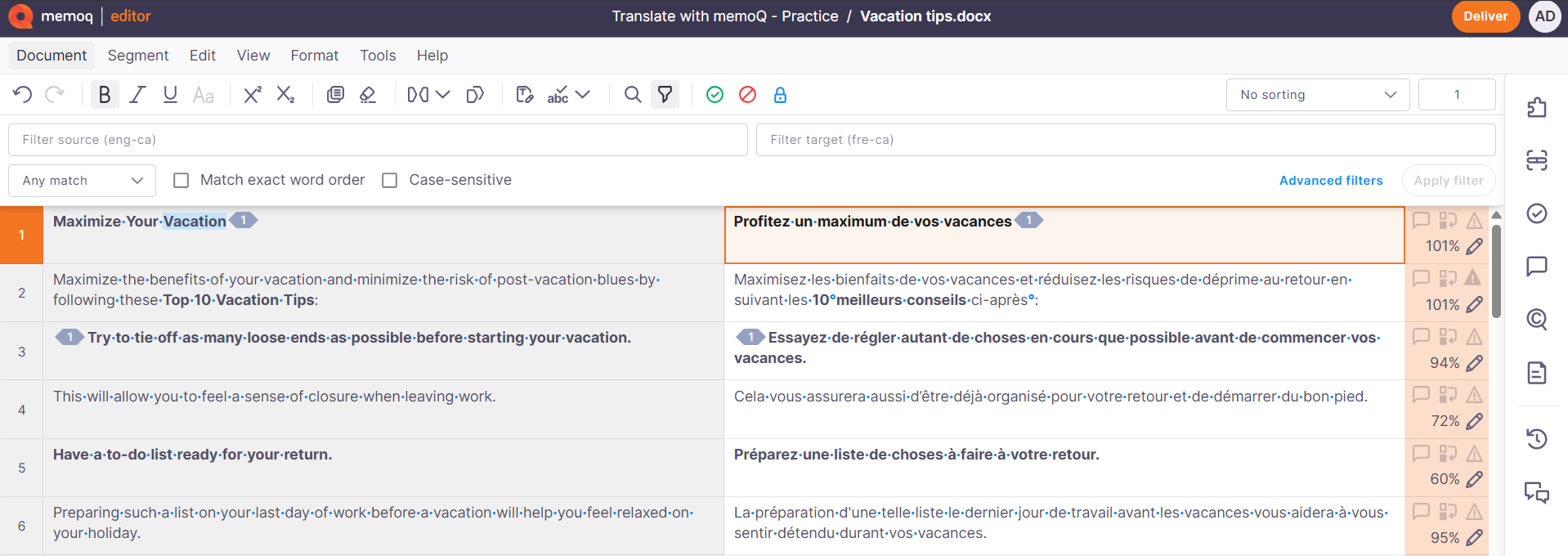
How Antidote works in memoQ editor
Using Antidote in memoQ is simple and intuitive.
- Open your project in memoQ editor
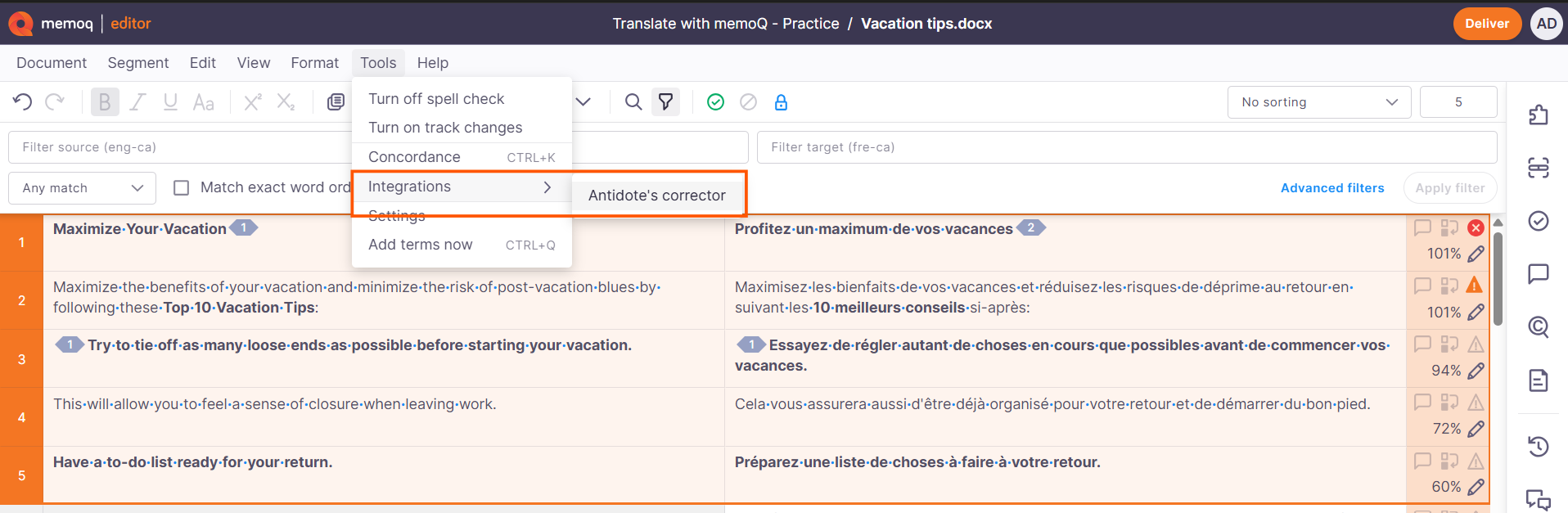
- Go to Tools -> Integrations -> Antidote’s Corrector
- Choose your scope: full document, selected segments, or filtered segments
- Antidote opens and displays suggestions by category
- Language (grammar, spelling)
- Typography (spacing, punctuation)
- Style (optional refinements)
- Review and accept corrections. Changes sync back to the editor automatically, then the user can confirm them in the translation memory.
Ready to Experience the Difference?
Whether you’re already an Antidote user or exploring ways to improve translation quality, this integration unlocks new levels of efficiency and confidence.
Two combined tools. One workspace. A seamless experience for users.
Frequently asked questions